Agentic Projects for project knowledge that carries across sessions and teams
Edison chats used to start cold: engineers re-explained the solver, the baseline jobs, the acceptance criteria and the known gotchas every time. Agentic Projects hold that context in one place to use across sessions. Attach a project to a chat and Edison, plus every agent it calls, starts with the project’s objective, standards, golden jobs (proven jobs with validated inputs and results, used as a baseline for future job configurations), report template and learnings, so the next session, or the next engineer, picks up where the last one left off.
Release Highlights
An Agentic Project is a container for everything Edison needs to know about one engineering project:
- Objective: what the project is trying to achieve, in your words
- Linked jobs and workflows: golden jobs to duplicate, baselines to compare against, and saved workflow templates to run time and time again
- Linked files and folders: standards, reports, and requirements uploaded to Rescale or from connected knowledge bases, e.g. SharePoint, Amazon S3 and Azure Blob
- Skills: reusable instructions and scripts agents apply, such as checking input files against your standards
- Learnings: tribal knowledge, rules of thumb, and lessons Edison applies when they’re relevant, suggested by Edison or added by you
Why we built it
- No more re-explaining. The context loads into every chat the project is attached to, whether you come back tomorrow or in three months.
- Knowledge stays with the project. Standards, golden jobs and lessons learned live on the platform, not in one engineer’s head, so they stay when someone changes teams.
- Corrections become team rules. Tell Edison “always validate input files before submitting jobs” and it offers to save that as a learning for everyone who uses the project.
- Answers you can check. When Edison answers from a linked document, it cites the source.
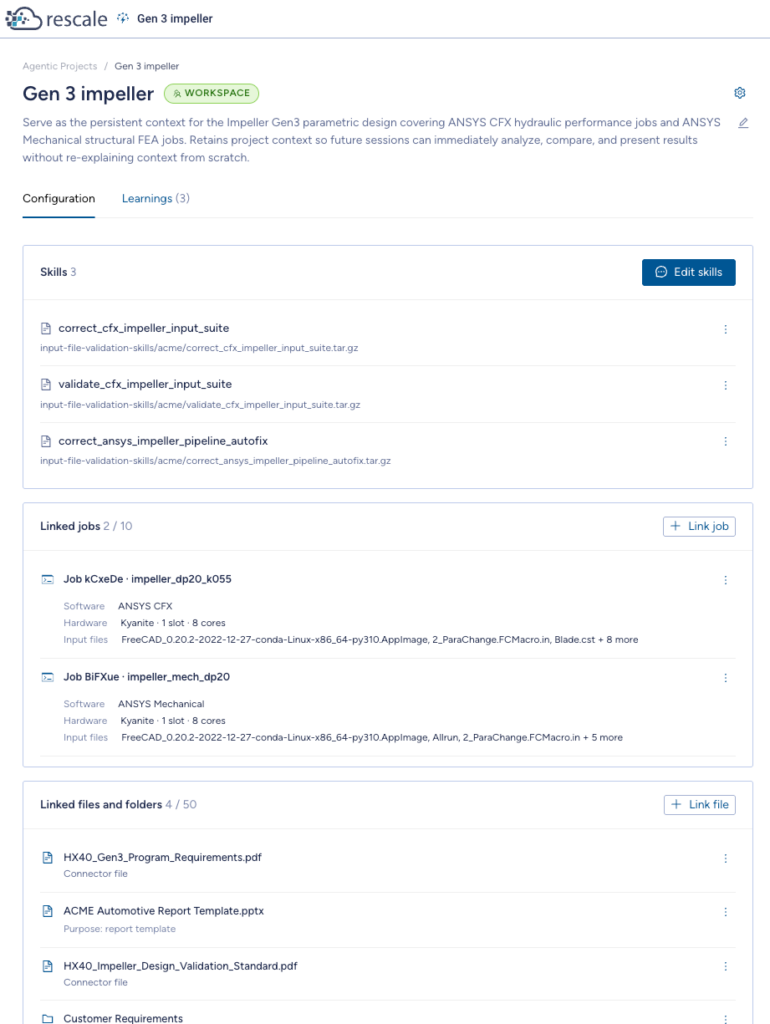
An Agentic Project holds a project’s report template, golden jobs, standards, requirements and learnings in one place.
Getting Started
- Go to Agentic Projects and create a project, or ask Edison to do it. Give it a name and say what you’re trying to achieve; that’s all it takes.
- Link what matters: golden jobs, standards and requirements files, a report template. You can do it on the project page or ask Edison, for example “Find my file in SharePoint and link it to this project.”
- In Work with Edison, attach the project to your chat. Edison and the agents it calls now work with the project’s context.
- Keep working. When Edison spots something worth keeping, it proposes a learning or a link; accept the ones you want saved.
Agentic Projects requires Agentic Engineering enabled on your workspace. Contact your workspace administrator or your Rescale account team to enable.
For more information see Agentic Projects.
Good to Know
- Private until you share it. New projects are visible only to you. Share to the workspace when it’s ready; teammates can use a shared project, and only the owner can edit it.
- One project per chat. A new chat starts with no project attached.
- Linked, not copied. A project links up to 10 jobs and 15 individual files and folders. Edison reads linked files as the person asking, so no one sees content they couldn’t already open.
- You decide what’s saved. Learnings and links Edison suggests are saved only when you accept them.