Meet Rescale Edison: Your AI Assistant for HPC and Agentic Engineering
The Rescale Assistant is now Rescale Edison. Click Work with Edison from any page to help you run your processes. With Edison now you can save your processes as workflows so they are easier to run in the future. You can ask Edison about your jobs, files, results, or spending to get specific answers directly in the chat. Your conversations stay with you as you move between pages, so you can ask about a failed job, open it, and keep going without starting over.
What’s Changed
Edison opens from the left navigation. The small sparkle icon in the top-right corner has been removed. Look for Work with Edison in the left navigation instead. It’s the same sparkle icon, now with a label, in the same place on every page.
Chats. You can now keep several chats with Edison and return to any of them. Within a chat, Edison remembers what was said and what it looked up earlier, so you can continue days later without starting over. Click New chat to start a fresh one. Edison titles each chat from your first message. You can rename or delete chats from the chat list, and deleting one asks you to confirm first. Chats are private to you, stay in their workspace, and are deleted automatically after six months without activity.
Nothing else about your account changes. Your permissions, workspace settings, and AI Credits are the same.
Highlights
- Always in reach: Rescale Edison sits in the left navigation on every page.
- Chats and Chat Memory. Users can keep several long-running chats, return to any of them, and rename or delete them. New chat replaces Clear.
- Save repeat processes: As you work with Edison to run your processes, Edison remembers your steps and can save your processes as workflows so it is easier to run in the future.
- Answers from your own data: Ask about jobs, files, workflows, results, or spending in plain language. Edison queries your Rescale account directly and charts the result where that helps.
- Within your permissions: Edison only reads what you could open yourself. Administrators get organization-wide or workspace-wide answers, depending on their role.
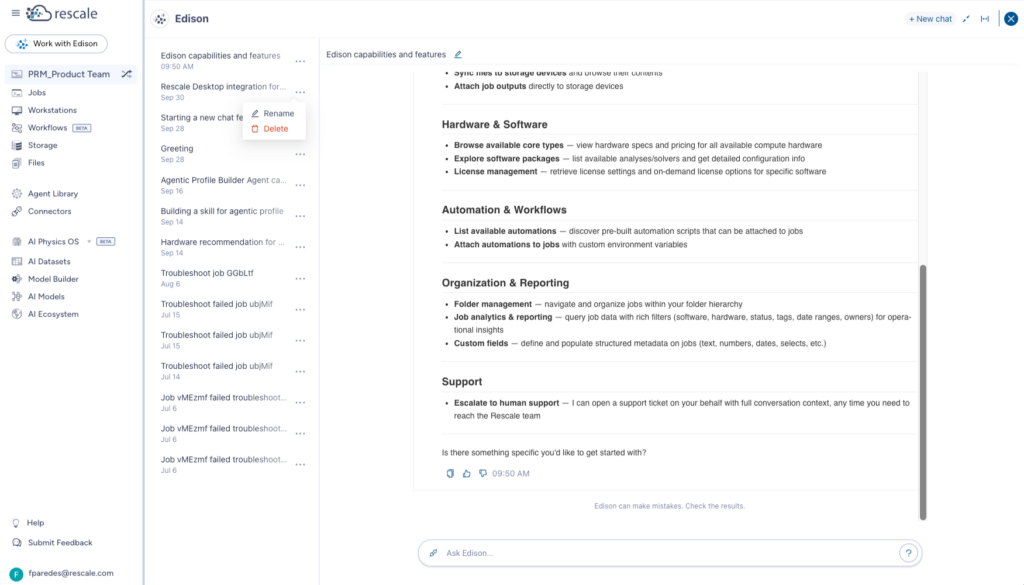
Work with Edison in the left navigation, with the panel open showing your chats, most recent first.
Get Started
- Sign in to the Rescale platform.
- Click Work with Edison in the left navigation.
- Type your question and press Enter.
- Open any other page. Edison stays open beside it.
Edison needs Advanced Modeling & Simulation or Agentic Engineering enabled on your workspace. If Work with Edison shows as unavailable, contact your workspace administrator or your Rescale account team.
For complete documentation, see Rescale Edison.