Job Priority Policies for Improved Cost Efficiency
.wp-block-kadence-advancedheading.kt-adv-heading96234_6b5c77-8d, .wp-block-kadence-advancedheading.kt-adv-heading96234_6b5c77-8d[data-kb-block="kb-adv-heading96234_6b5c77-8d"]{margin-top:1px;margin-bottom:15px;font-style:normal;}.wp-block-kadence-advancedheading.kt-adv-heading96234_6b5c77-8d mark.kt-highlight, .wp-block-kadence-advancedheading.kt-adv-heading96234_6b5c77-8d[data-kb-block="kb-adv-heading96234_6b5c77-8d"] mark.kt-highlight{font-style:normal;color:#f76a0c;-webkit-box-decoration-break:clone;box-decoration-break:clone;padding-top:0px;padding-right:0px;padding-bottom:0px;padding-left:0px;}.wp-block-kadence-advancedheading.kt-adv-heading96234_6b5c77-8d img.kb-inline-image, .wp-block-kadence-advancedheading.kt-adv-heading96234_6b5c77-8d[data-kb-block="kb-adv-heading96234_6b5c77-8d"] img.kb-inline-image{width:150px;vertical-align:baseline;}
Introducing Job Priority
Workspace admins can set a Job Priority policy that lets users defer eligible jobs to start in daily off-peak hours in the next 24 hours. Users can also take advantage of Job Priority without needing a set policy from admins by opting into the deferred start time on their own. A discount on compute infrastructure costs will be applied for deferring jobs.
.wp-block-kadence-advancedheading.kt-adv-heading96234_7c453b-17, .wp-block-kadence-advancedheading.kt-adv-heading96234_7c453b-17[data-kb-block="kb-adv-heading96234_7c453b-17"]{margin-top:1px;margin-bottom:15px;font-style:normal;}.wp-block-kadence-advancedheading.kt-adv-heading96234_7c453b-17 mark.kt-highlight, .wp-block-kadence-advancedheading.kt-adv-heading96234_7c453b-17[data-kb-block="kb-adv-heading96234_7c453b-17"] mark.kt-highlight{font-style:normal;color:#f76a0c;-webkit-box-decoration-break:clone;box-decoration-break:clone;padding-top:0px;padding-right:0px;padding-bottom:0px;padding-left:0px;}.wp-block-kadence-advancedheading.kt-adv-heading96234_7c453b-17 img.kb-inline-image, .wp-block-kadence-advancedheading.kt-adv-heading96234_7c453b-17[data-kb-block="kb-adv-heading96234_7c453b-17"] img.kb-inline-image{width:150px;vertical-align:baseline;}
Highlights
- What is it?
- An admin‑configurable policy to opt-in users automatically to run jobs during daily off‑peak hours. A discount on compute infrastructure costs will be applied for deferring jobs. Engineers can have the option to opt-out.
- An opt-in option for engineers when setting up their jobs to independently select to defer their jobs to run during off-peak hours for the day.
- The start time for off-peak hours is 3:00 am UTC.
- Why did we build it? We are always looking for ways to help our customers reduce compute infrastructure costs. While some customers need a solution as quickly as possible, others prefer to prioritize cost efficiency or spread out their jobs due to license constraints and next-day results are sufficient. This new tool provides the flexibility to balance that tradeoff between urgency of a job and compute costs in a consistent way.
- How is it used?
- Admins create a Run During Daily Off‑Peak hours policy, scope it to a Workspace or specific Projects, and choose if users may opt out.
- If no admin policy is set, users can independently opt-in to run their job during off peak hours.
.wp-block-kadence-advancedheading.kt-adv-heading96234_84b648-59, .wp-block-kadence-advancedheading.kt-adv-heading96234_84b648-59[data-kb-block="kb-adv-heading96234_84b648-59"]{margin-top:1px;margin-bottom:15px;font-style:normal;}.wp-block-kadence-advancedheading.kt-adv-heading96234_84b648-59 mark.kt-highlight, .wp-block-kadence-advancedheading.kt-adv-heading96234_84b648-59[data-kb-block="kb-adv-heading96234_84b648-59"] mark.kt-highlight{font-style:normal;color:#f76a0c;-webkit-box-decoration-break:clone;box-decoration-break:clone;padding-top:0px;padding-right:0px;padding-bottom:0px;padding-left:0px;}.wp-block-kadence-advancedheading.kt-adv-heading96234_84b648-59 img.kb-inline-image, .wp-block-kadence-advancedheading.kt-adv-heading96234_84b648-59[data-kb-block="kb-adv-heading96234_84b648-59"] img.kb-inline-image{width:150px;vertical-align:baseline;}
Getting Started
- Find Job Priority Policies under Policies in the workspace admin portal.
- Create a policy: choose Run during daily off‑peak hours, set scope (Projects or whole Workspace).
- Activate: eligible jobs will schedule for the off‑peak window at submission (with user opt‑out if enabled).
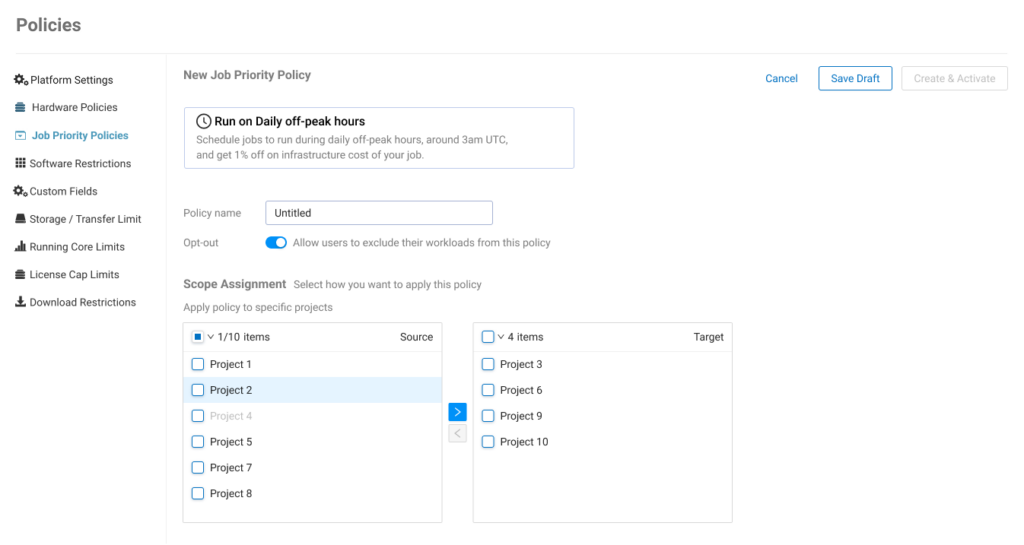
Access and Set Priority Policies from the Workspace Admin Portal