Multi-Workspace Budgets for Managing Consumption
Rescale Budgets can now manage multiple workspaces of an organization. This enhanced functionality simplifies budget management for organizations with teams and projects spanning multiple workspaces, allowing for a single budget instead of separate budgets for each workspace. Only Organization Administrators can set and manage these multi-workspace budgets.
Introducing Multi-Workspace Budgets
Highlights
- What is it? Administrators can now target budgets at the organization level by selecting one or more workspaces when creating a budget. This new Organization option in the budget target menu is compatible with both Cost and Core hour budget features.
- Why use it? Using multi-workspace budgets simplifies budget management by allowing organizations to manage budgets for teams that span multiple workspaces as a single entity, rather than having to allocate and track separate budgets for each workspace.
- How is it used? Organization Administrators set and manage multi-workspace budgets within the existing Budgets menu. Similar to other Budget types, they are notified via alerts when the budget consumption levels reach 50%, 80%, and 100%.
Get Started
To create multi-workspace budgets, go to the Budgets page and choose Organization as the target when creating new budgets. For additional guidance, please refer to the product documentation on creating multi-workspace budgets.
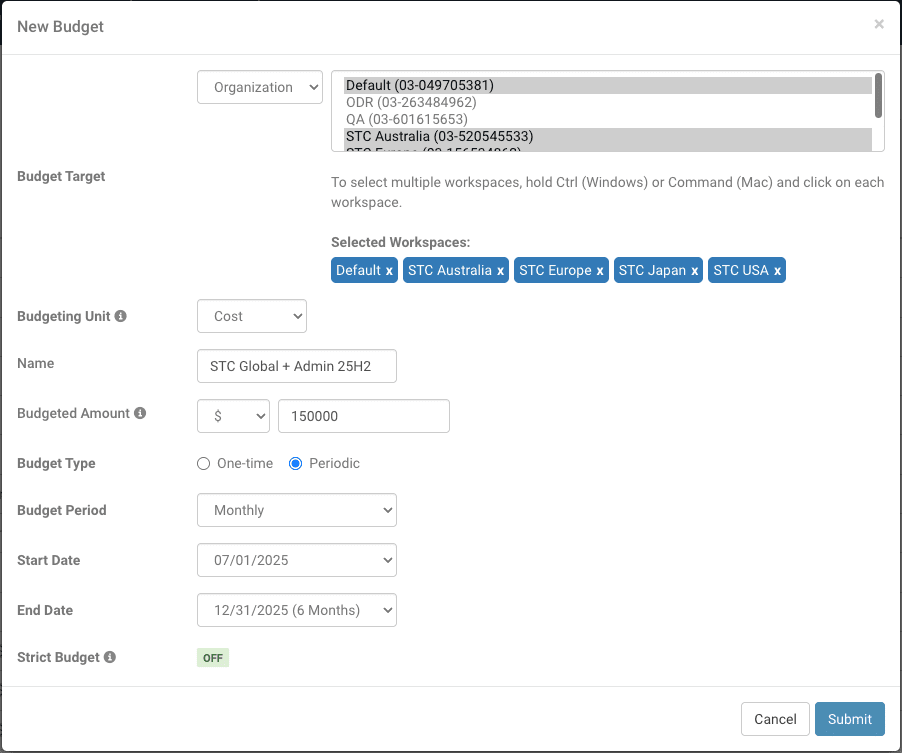
Creating Multi-Workspace Budgets