Workflow Templates from Rescale
Getting started with Rescale Workflows just got easier. Workflow templates have been available for building, sharing, and running reusable multi-step simulation pipelines. You can now create new workflows from Rescale-provided templates that cover the most common simulation pipeline patterns — parallel processing, dynamic hardware routing, centralized admin configuration, and AI-agent-enhanced validation. Browse templates directly in the workflow creation flow, run them as-is with your own inputs, or duplicate and customize them to fit your specific needs.
Release Highlights
What is it?
Four curated workflow templates, maintained by Rescale, are now available to all platform users. When you click + New Workflow, a dedicated “Rescale Templates” section appears below your organization’s templates with a preview canvas so you can see each template’s structure before selecting it. In addition to running these Rescale templates as-is, you can also duplicate and customize them for your use cases.
The four templates are:
- Pre- and Post-Processing Pipeline — A fan-out/fan-in pattern where a pre-processing job generates multiple input files, parallel solver jobs process them simultaneously, and a post-processing job consolidates the results. Ideal for maximizing throughput on multi-variant simulation runs.
- Dependent Job Configuration — A Decision node evaluates upstream job metadata (via Custom Fields) and routes execution to the right hardware configuration based on problem size. Automatically right-sizes compute resources so you stop over-provisioning small jobs or under-provisioning large ones.
- Admin Template / Job Configuration Management — A chain of Decision nodes routes uploaded input files to pre-configured solvers (Abaqus, LS-DYNA, Python) based on file type. Template builders lock down approved software versions and hardware; end users just upload a file and click Run. Built for license compliance, cost control, and team onboarding.
- Agent-Enhanced Workflow — An Input Validator agent checks your file before the solver runs, and a Troubleshooter agent automatically diagnoses failures and proposes fixes. Catches invalid inputs before compute resources are allocated, saving time and cost.
Why did we build it?
Building a multi-node workflow from scratch requires understanding node types, connections, parameters, and execution patterns. Customers told us they wanted vetted starting points they could learn from and adapt — not just documentation, but working examples they could run immediately. These templates reduce the time from zero to a working workflow from hours to minutes.
How is it used? By whom?
- Simulation engineers can use templates as a starting point to run common pipeline patterns (parallel processing, conditional routing) without building from scratch.
- Workflow authors and template builders can duplicate templates and customize them — add solvers, change hardware, modify parameters, and share their versions with their team.
- IT admins can use templates to enforce standardized solver configurations and control which software versions and hardware are available to end users.
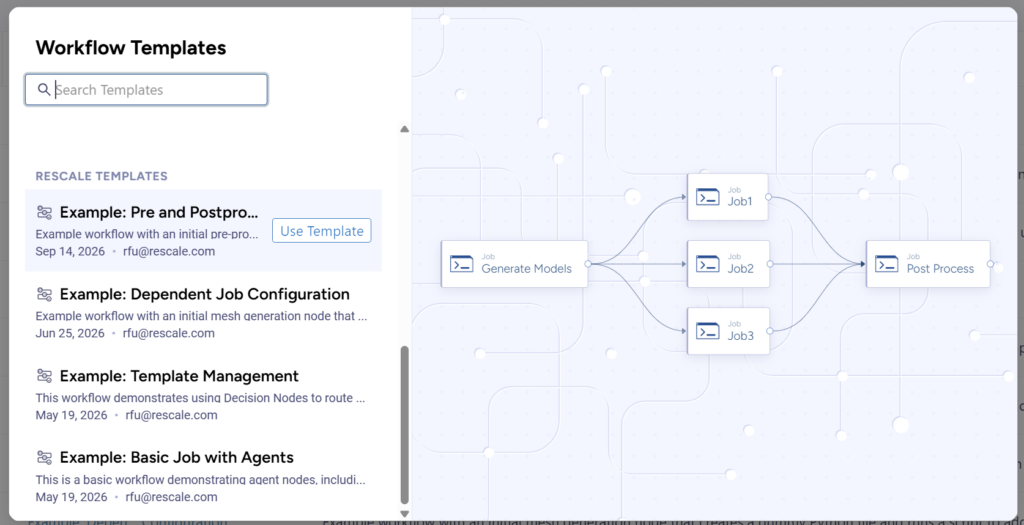
Browse and preview Rescale-provided workflow templates directly from the workflow creation flow.
Getting Started
To run a Rescale workflow template
- In the left navigation, click Workflows.
- Click + New Workflow.
- Browse the Rescale Templates section in the template picker.
- Click Use Template to run it with your own inputs.
To review or modify a Rescale workflow template
- In the left navigation, click Workflows.
- Select a Rescale template from the table to review the template configuration.
- Click Duplicate to create an editable copy you can customize.
For additional information, check out the Workflow Templates from Rescale documentation.